Walkie Talkies Solution Over the Internet PTT

We are all familiar with the normal standard walkie talkie that we see guards, stores, restaurant, police and many other agencies or groups using.

What we may not be familiar is that they are mostly controlled items as their primary build and use was for enforcement. Their larger and longer range cousins were for military and defense usage.

Now the traditional walkie talkies go over the air either in analog or digital forms. There are some variations such as over the satellite.

Over the last few years with the increased usage of internet and the conversion to wider spread of internet usage with its terminals. Walkie Talkie functions have also had a migration across with many methods. The most widely spread version is on the IMS platform. Specifically the PUSH To Talk system. In some sense it is like a digital intercom except it can go one to one and one to many.

The presence of this function is in many Chat applications and other dedicated built applications. The hard ware need not be specialised. But there are specialised hardware available for those whom prefer specialised hardware.

The for public use especially the licence not required category normally has a small throw of below 5km. Further than that a licence is required per device and only trained users with licences to use can own and use the units. Other person allowed to use would normally be enforcement personnel.

So with the short range limit or licenced required for device and operator higher range variants, what you may end up with would be clusters of connected persons then needing to swap to a mobile phone or land line for longer distance communication.

PTT in its bearest state just needs data networks based on IP (Internet Protocol). So it can be hosted on wifi, mobile internet and data over satellite.

PTT could be in one group or a one to one communication of known users.

The friendly part of PTT even if you are in one site. You could also create purpose/role/responsibility or other reasons for grouping. Even within one site. And a single user can belong to many groups.

With above configuration of usage. You can also extend the usage to multi sites. Same features. But as different groups. And number of users could belong to groups from other sites too.
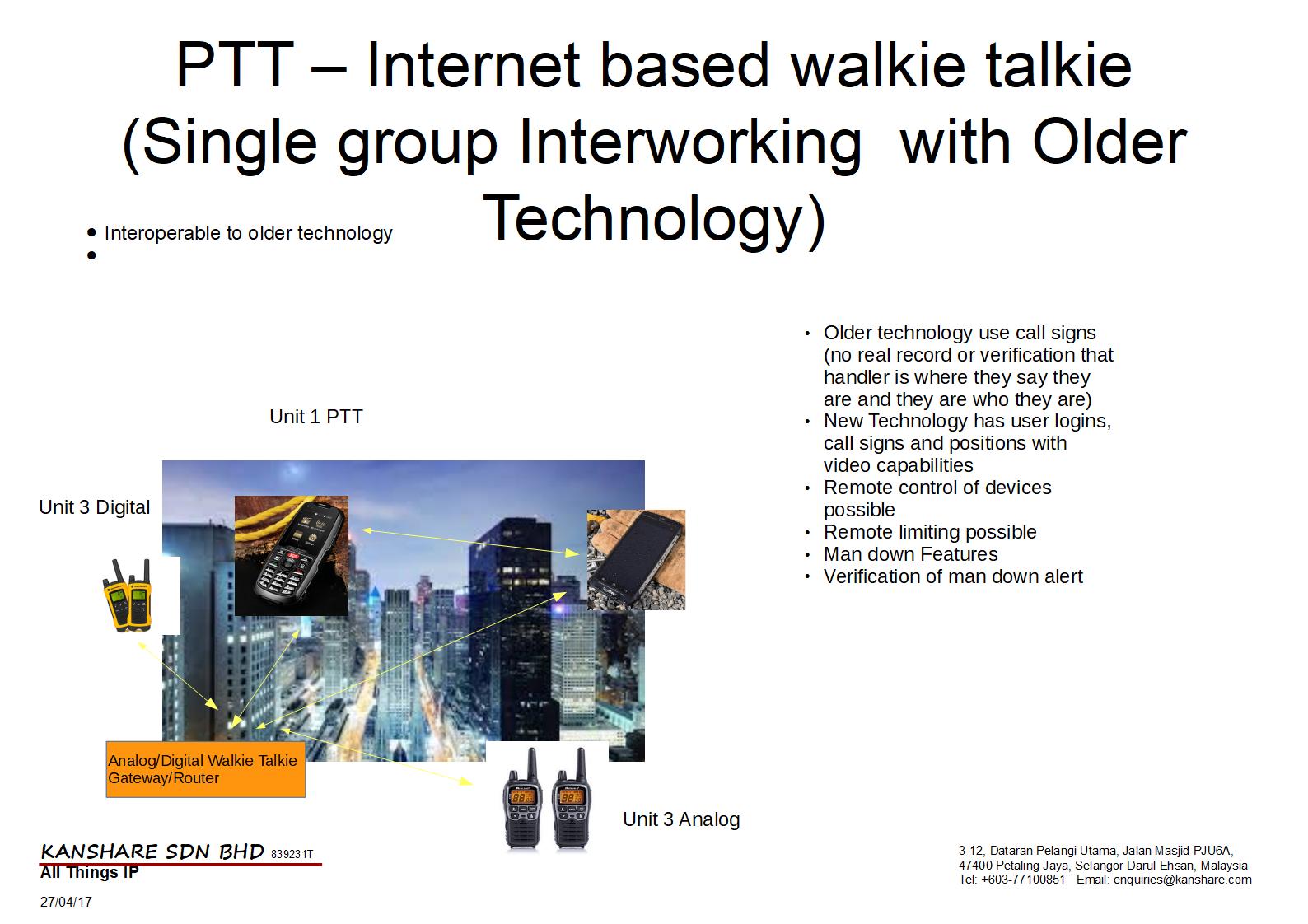
Now the traditional sets would have cost a huge amount of money. As such to switch over can be a barrier. Also having too many different technologies that dont talk to each other could put off any sane user.

However there are solutions to integrate the old with the new. As in the case with either embedded gateways within the device or separate gateways per site.

With this you would retain the ability to use the old sets using unverified call signs and unverified locations. With the current by user login, password, gps position with visual verification by video and still image new technology PTT (internet walkie talkie).

The best part is that the technologies can mix and the features can be extended within the environment even down to putting digital fences using GPS and other positioning tools. Hence creating what is called a geo fence. This can be used in a positive manner of providing notification to the user that he is partroling further than his agreed area. And for the central monitor that the user has exceeded his area of partrol which could mean something that is bad has happened. And with the right device have even control to remote enable camera, communication and more for verification that the user is fine.

For KANSHARE SDN BHD. We have a new principal and partner that provides us ruggedised versions of this solution in a smart phone walkie talkie format and also other providers whom provide it within a body camera format.

Types of users and industries

  1. Guard companies (Guards, supervisors, owners and customers)
  2. Event companies
  3. enforcement units
  4. Communities
  5. Gamers
  6. Delivery people (Pizza, food, product, mail)
  7. Service people (Photostat machine technicians etc)
  8. Rescue Services
  9. Ambulance services
  10. Fire Services

Interested in the solution?

email us at enquiries@kanshare.com

Valuable in Transit – One Example Cash In Transit (CIT) and ATM Cash Cassette Replenishment

Introduction

The risks of valuables transportation services (cash, jewelry, intellectual valuables etc) along with valuable replenishment services (ATM cash replenishment and retrieval) to name a few are high as are the cost for the services.

Specifically Cash In Transit (CIT) or the service activity of transporting money for legal entities is a large business due to the level of risk. This normally requires many factors to reduce those risks. But with cost as a consideration viability normally could reduce the measures that are taken. Thereby directly increasing the risk.

The task normally consist of the pick up activity (This is where verification actvities and accountabilty take over activities are carried out.), the actually transportation activity (This would be remaining vigilant, Protecting, driving and avoidance) and finally at the destination is the Handover activity (where verification again take place, accounting and transfer of responsibility)

In Malaysia additional activities that are also outsource to guard companies the actually loading of money into ATMs. Hence even more risks are exposed.

Risks

Some of the risks that arise are : –

Any activity dealing with cash or valuables and not handled by the owner themselves bring about the following: –

  1. Honesty
  2. Reliability
  3. Attack
  4. Theft (internally and externally)
  5. Loss by any other means (fire, wind, earth quakes, acts of nature, etc…)

Addressing the Risks

Even though the activity may bring risk the rewards can also be fulfilling for the right people. To ensure the risk is worthwhile and to reduce them some measures must be taken. The following are the ones taken today:-

  1. Primarily hiring honest people.
  2. When not available to reward people that will reduce their willingness to commit the crime.
  3. Then is to use secure carriers that limit the persons whom can access the item. (i.e. strong boxes with locks/combination, key release, biometric, a mix combination and many more.
  4. Have good handling processes. (Limited knowledge and access to those processes, Check in, multi verification medium, methods and more)
  5. Tools, Tracking and Recording (TTR)

Raising the Bar

In addressing the act of raising the bar beyond the cost of vehicle, fuel and man hour rate, There is more to be provided with justifiable cost increase but higher benefits in terms of security and possible reductions on other protection received as rewards in reduced insurance premiums and more for the companies involved.

Tool, Tracking and Reporting (TTR)

Though there were 4 other items of main issues and measures needed to be addressed , we will only deal with the fifth one which is Tools, Tracking and Reporting. Though it is not said that there is none today (And there cannot be no measures in place), the measures used could be updated and upgraded to increase transparency, insert digital tracks with alarms when conditions not met and reporting of the overall activity (in action and when action completed).

The three main components to be enhanced is the vehicle traceability, the cargo with path validation and personnel support. This by tagging with real time tracking visually, audio and GPS positions. of all components involved in the service/activity.

With all those components in place the hidden or unknown better yet described limited information for verification previously available possible due to technology. The increase of it in tandem with the tried and proven processes, illuminated by the current availability to provide real time viewing with evidence (real time and post time) of the service being carried out.

But not withholding the best improvement yet, the ability to provide remote support when the risky events occur. Such as calling in relevant personnel and parties when robberies or interception of the valuables occur.

This in itself will increase the risk factor to the criminals and increase the safety factor to all provider personnel and customer valuables.

But though it may improve capabilities. It does not eliminate the original risks at all.

What to know more about the solution or have a quotation for implementation? Email us at enquiries@kanshare.com

Note the products and solutions displayed are provided by manufacturers and distributors as products for our reselling and deployment in solutions designed in part or integrated as a whole from one or many ideas.

The brands or indicators/inference of a particular brand does not mean that the solution or component for that part of the solution can only be delivered by that brand or inferred brand.

Cost, preference and other factors may drive variation to the frame of ideas elaborated above.

IP rating on electrical products briefly explained

Now when buying electrical products from time to time you would note that in the information it would say IP xx rates. Example for outdoor suitable devices the common rating claimed would be IP 66 which is state to have certain criteria suitable for outdoor use.

To quote a description from one website (credits listed as a link)

“IP (or “Ingress Protection”) ratings are defined in international standard EN 60529 (British BS EN 60529:1992, European IEC 60509:1989). They are used to define levels of sealing effectiveness of electrical enclosures against intrusion from foreign bodies (tools, dirt etc) and moisture.” – www.enclosurecompany.com/ip-ratings-explained.php

To quote another description from another website (credits listed as a link)

The IP (International Protection) Rating of a product is represented by two numbers. The first digit is the protection rating against solid foreign objects (i.e. dust) and the second digit represents the protection against the ingress of water. The ratings available and descriptions are as follows:

First #
Solid Foreign Object

Second #
Water Ingress Protection

0
no protection

0
no protection

1
protected against solid objects up to 50mm

1
protected against vertically falling drops of water

2
protected against solid objects up to 12mm

2
protected against direct sprays of water up to 15º from the vertical

3
protected against solid objects over 2.5mm

3
protected against sprays of water up to 60º from the vertical

4
protected against solid objects over 1mm

4
protected against water splashed from all directions

5
protected against dust

5
protected against low pressure jets of water from all directions

6
totally protected against dust

6
protected against strong jets of water

7
protected against immersion

8
protected against complete continuous submersion in water

” – http://www.codecorp.com/iprating.php

To get the most current explanation the best place of course would be to get it from the standards body itself that has ratified (created/agree/provided) these standards.

But what you need to know and be aware is that there are some standards and regulation that provide you some minimum and in most cases best protection for your purpose.

So the next time you have a product that you require for use in possibly challenging conditions do look for the one with the features most relevant to your need.

Price isn’t always a factor of quality or suitability. Read the specifications and standards adhered to.

Single Wire IP CCTV Solutions

Today where technology has advance so far and the density of human population per square foot increases year on year, the choice to increase security solutions and also put it in your hands rather than hands of strangers is higher.

With the options available it can be confusing and daunting.

KANSHARE SDN BHD has taken the bull by the horns and has taken into its line up single wire CCTV solutions.

What is single wire IP CCTV solutions?

Normally a typical cctv solution requires a viewing capability. That would be refered to as the video (data traffic) images. That would go on one kind of cabling to a recorder with or without a screen. Then to have the device function such as the camera and the recorders they would require power.

Now power can come as a individually prepared power socket that an individual device power adaptor would connect to it or it could come from a central power unit.

Each of these would require one set of cables for data and one for power.

With the single wire CCTV solutions the single wire you pull will carry the power and the video (data traffic) images.

We have single wire for most conditions. They are:

  1. POE (Power Over Ethernet) that is normally used in environments that have ready ethernet cabling that is suitable or new installations where renovation is to be done or any refurbishment work.
  2. POC/EOC (Power Over Coaxial/Ethernet Over Coaxial) this is normally recommended as an upgrade/conversion solution for users whom already have existing systems based on the coaxial cabling (similar to your cable tv or tv terrestrial antenna cable (free to air tv cables). This will bring you great savings in wiring and making good in your installation activities.
  3. PLC (Power Line Communication) this is ideal for places where the renovation has been long completed and the CCTV system forgotten. It is also good for older places that never had CCTV solutions in place. This solution just plugs into your normal 13 amp power socket that you would plug your tv in or blender etc. The power and the video will go along that socket.

Now what ever solution you choose will end up in a recorder refered to as an NVR (Network Video Recorder. Formerly known as a DVR (Digital Video Recorder) in the digital/analog cctv solution.)

Todays recorder not only records, it is a central controller, it joins many images in one view (multiplexer), it also rotates between views (switcher/patrol function), it also provides remote viewing on a peer to peer basis from local to local view and local to remote view (anywhere far away from your home network). It also provides a cloud solution to simplify your connecting requirements from a far off place to your home or work space for what ever reasons you may have.

They are even mobile, with positioning but that is for another topic in our future.

Also to have more details on how each technology is connected and functions in as simple a manner that we can. Keep a look out for our future posts.

For an example of products supporting those technologies follow the links below. Else send us a enquiry at Enquiries@kanshare.com

General Products

http://kanshare.com/Products/

  1. POE http://kanshare.com/Products/cctv-solutions-poe-power-over-ethernet-ip-internet-protocol-technology-for-cctv/
  2. POC/EOC Email us for enquiries
  3. PLC http://kanshare.com/Solutions/wp-admin/post.php?post=78&action=edit

The grade and quality varies but we are sure we have one that will meet your needs. Pushing 2mp (1080p) and higher, but we still do have lower 1.3 (960p), 1.0 (720p) and analog/analogHD.

Tuning

Tuning Rev 1

Isnt tuning the same as configuration? Well it can at times be taken for granted as the same as you may adjust the same settings or function controls. But what essentially tuning is the fine adjustment of placement and settings of your device within your environment or use. This is can be for optimal value or use (sometimes this could be refered to as optimisation) or just the best value for your taste. It may not make much difference to the function in general in most cases where it is done towards the taste of a user or group of users.

But it can make a world of difference when its is conducted for performance. Much like you would adjust and tweak your car or sound system or even make up and art.

What ever the purpose that you run through this activity. Its good to keep in mind that the skill sets may be different and the activity is definately different.

So when securing your service solution do check on what it really includes. It sometimes may be that it is more value that you realise.

The Difference Between Installation And Configuration

DiffBetweenConfigurationNInstallation Rev 1b

Often we are confused or lead to think that installation and configuration are the same. We are also lead to believe that we always need both. Generally we need Installation, but configuration may already be defaulted within the installation process (when software), hard coded in (for software and hardware) or preset (hardware and software).

So what is installation, well when hardware alone is involved or included, it is the process of unpacking, assembling, mounting (where necessary), connecting and interconnecting. This will encompass and include parts, accessories and cables. What it may require in addition to what has been packed is additional parts, mountings, accessories, cables and installation materials. The installation can include but not limited to cable casings, cable clips, cable ties, screws, rawl plugs, rawl bolts and much more. The quantities and requirements definately vary from product to requirement.

In the installation the tools required may be more tangible and physical then in the configuration part. They could start from simple tools such as screw drivers all the way to specialised tools like meters and power tools. Even software has an installation part which in that case is more logical than visibly physical. However what it normally will be is introducing it into the unit that is hosting this software (be it appliance(router, vendor specific device, etc) or terminal (Pc, tablet, phone etc)). In the case where the installation is mainly software, the configuration part may appear seemless with preset information which will get it to work or very simple to insert information such as user name, password etc that the two seem like the same thing. But realistically it is totally two different activities.

Now configuration on the other hand is setting the parameters to get the system going. Now this could also include the creation of accounts, where unique ids and authentication is required (Even basic general use) and other working environment parameters to ensure the equipment or device works for that environment that it is setup for. This can be tricky and may require more specialised knowledge. The configuration could also vary from version to version of the equipment or software used. Now when software is more complicated and requires interworking with other software and hardware there may be extensive design work prior to the configuration work that is needed. The extent and number of experts will depend on the complexity and the skill of the person. Some may require proper trained or experienced technicians, engineers, programmers or integrators.

As with anything the cost of the above varies very widely according to complexity, cost environment (some skills in some countries may cost more due to labour regulations or market dynamics that cause low availability due to high demand or low interest to do such work.) and period that you may want to do that work.

So when getting anything ensure that you are getting both installation and configuration included or that its easy enough that you can do.

Installation And Configuration

Installation and configuration differences

Life Cycle of a System (Applied to product, service and need)

LifecycleOfASystem Rev 1

The search

In the choice of fulfilling a need or want with the use of systems or solutions, the product aspect of choice is only a small portion in most cases, exceptions being pure out of the box consume and dispose products. These would be like bread toasters, lights in bulb or tube formats (all inclusive of other forms too.), tvs, radios, ovens, washing machines and more. These items configuration comes in forms of hard add ons or settings that can be varied in its limited preset ways. Adaptability has come down to a package form. Any need not met is addressed by finding a model more suitable or adjusting your needs to your chosen devices.

On the other extreme is the every element requires customisation and tweaking to your needs. These items too today have more and more become packaged in a manner on the options that you may choose or what it will interwork with. These are much like the banking solutions you buy, jewelry and much more.

The in between would be items that can be mixed and matched. They also work on a variety of options that fall into a certain category. Such as items that require wires. And how the wires can be laid or prepared. In an exposed manner or hidden. There are a whole host of options and choices in this “standard mix and match” segment. Items like security tools. CCTV, alarms, door access systems, cars and more.

For these a search and evaluation period is required. The best case would be a consultant or a good sales person. But in the later category without a little home work on your own to get a feel and understanding may lead to a skewed to the brand of their benefit. ( i say this in the manner where either they have expertise on the more positive segment to the part where they get rewarded for choosing those items.) As such it is a tricky mine field for the purchaser of today. Integrity apparently is a rare quality.

The decision

Next when you move on to the decision to purchase comes a choice of if its possible to get something that is preconfigured and delivered or configured on site. The preconfigured variant normally implies that it can also be easy enough for you to manage or that the cost to reconfigure could be considerably lower as it would be possible to use remote solutions for adjustment and maintenance. But not necessarily so though.

Installation

Normally at the installation stage, its more of an out boxing and connecting all components.

The configuration

Most systems in the middle tier and upper tiers require some configuration. What is configuration? Read more in our upcoming article to have a better understanding. But to proceed at this level, the lowest level of configuration requires the input of some basic settings of the level you want your product to perform at or start up. Yes todays products starting level if is up to current demand is workable out of the box. And configuration normally could be tweaking or personalising.

The testing and commissioning

Once installation and configuration has been complete. A test from basic to vigorous should be attempted before daily use. But you can go the use and fix method too.

Maintenance cycle.

After all use, there should be some maintenance introduced from a basic clean and check up to a more vigorous disassemble and reassemble replacing worn parts if not at least inspecting for wear and approximating end of life. (replacement period).

Expand or upgrade, replacement could be in the cards

If you had purchased a roboust product from technology to durability you will have the option to expand or upgrade its capacity, capabilities with features or more. You will once again head down the search, decision and act path once again. But if its on an expand or upgrade the choices should be more limited. Not necessarily cheaper. But in todays agenda reuse, and extending life is the mandate to keep landfills at controllable levels. Should replace come up due to expiry of the use due to wear or currentness, then your decision process will lead you back into a wider scope to explore as when you first got into this cycle.

And in conclusion there brings you back to the beginning of this article.

Getting more from your office lot

With the property market having more and more unit ready for occupation or use the challenge to get good returns is becoming challenging. The secondary market has more filtering by banks for loan approvals hence earlier planned and predicted flipping has now to be delayed by those with holding power. (E.g. Can still afford to make the monthly payments without having tenants. Normally able to wait out the  5 years to avoid taxation on gains and even at worse case wait till 10 years or more for better resale by nature of natural reasonable appreciation. For this category of investor they can afford to be more selective on their tenants and also the amount they rent it for.

For the practical investor they will look at any rental as supporting towards their collective final profits on thier investment. These investors are generally not too rigid on the planned gains they should have made.

But there are the general investors whom had done minimal investment with expectation for high returns. Generally they played on potential opportunity with little back up security. For this investor when this model does not provide the expected returns they are at times forced to release their investment at very low prices.

Now what ever kind of investor they will always be exposed to experiencing diffculties. On selling such as period presenly prevalent are the lower secondary market due to many reasons. On rentals as the demands for higher deposits, higher compensations from thier realtor agents, difficult tenants, tenants whom do not look after their property, or do not revert the property to original condition as it is not practical from a cost perpective and more.

One additional and more attractive option is to provide complete facilities which even include internet lines and phone lines. With a little investment the standard investor can expand into a serviced office provider whom has full rights on a daily basis if they so wish to have access to the premise. If management and operation proves to be a challenge, they can always subcribe or team up with existing providers to operate the facility for them.

Interested to know more. Send your questions to enquiries@kanshare.com.

Who is the best broadband provider?

Have been deploying a few routers to upgrade my office network and also trouble shooting other people networks. In the last few weeks many people have posed this question to me… Who is the best broadband provider?

Well here in Malaysia it is very very subjective. Why well your location plays a role. Reasons being do you have fiber networks? do you have many broadband users? Are you measuring against wired or wireless, Fixed or mobile?

Well for the fixed users here is my answer.

I have been one of the fortunate users of TM HSBB at 20M and the speed and stability is beautiful. But then again my question will it remain as many more users get on board.

Next is Optixnet whom ever is fortunate to have them around.

All the rest are a distant second (or in this case third fourth etc).

On Mobile. Well if you are talking Wimax well everyone is still in the gearing up stage just like GSM and 3G was many years ago.

If you talking about 3G. Well Celcom wins hands down on the network availability and quality. All else well…..

But if you cant trust any well go with something that has redundancy. And this Dlink DIR-655 is excellent. It has Support for wired(optical included) and Wireless (USB) 3G. You can set it as to go over both links at once(redundancy) or when either fails (Hot/cold failover). This usb port can also host usb harddisks for sharing with all of your family.

And if your house has many users or even big that needs distance well TP-Link TLWA701ND can help you extend and expand this with it full feature set of wreless client, wireless repeater, bridge, wds and more. All at a very low price. Curious? call/mail/skype us at our 3CX IP PABX.

If you feel challenged by the issue of configuration go to www.kanshare.com to e-mail, skype us to leave us an order. We will configure and deliver with installation for you.